Published February 13, 2026
Announcing Alert Console: Stop Drowning in Alerts. Start Seeing What Matters.
Today we’re announcing Alert Console, a long-running AI agent that continuously analyzes every alert in your environment, triages high-volume streams, and surfaces only context-rich, actionable issues.
Instead of asking humans to scan dashboards and alert channels, Alert Console investigates everything automatically: grouping related alerts, modeling historical behavior, and escalating only what warrants attention.
For teams operating at enterprise scale, this replaces manual triage with continuous, machine-scale reasoning. We built Alert Console because alert fatigue is fundamentally a scale problem. Modern enterprises generate more alerts than any human team can realistically interpret, and the gap between signal volume and human attention keeps widening.
Alert Console is available now. If your team is handling thousands of alerts per day, book a demo to see how Traversal turns alert volume into actionable understanding.
When Pepsi first approached us, they were dealing with this precise challenge: more than 15,000 alerts firing every day across business-critical infrastructure.
This wasn’t the result of neglect or poor engineering. Over time, teams had instrumented what mattered. Each safeguard made sense in isolation. But at scale, those decisions compounded.
The result was an alerting system that produced far more volume than any human team could realistically process. Attention—not data—became the bottleneck.
That’s the reality for most large enterprises today.
The Alert Fatigue Trap
We've heard versions of this story from teams of every size:
“When I’m on-call, I spend hours monitoring alert channels instead of doing real work.”
“I wake up to hundreds of alerts and mark them all as read—you just hope nothing important was buried.”
“We know ignoring alerts is risky, but we can’t watch everything.”
Ironically, alert channels contain exactly the signals teams need: early warnings before incidents, corroborating symptoms that explain blast radius, and patterns that only emerge when grouped together. The information is there, but it's buried under thousands of alerts that nobody has time to interpret.
The Problem Isn't "Noise." It's Context
“Noise vs signal” is the wrong framing.
When alerts fire repeatedly, teams label them noise and mute them. But that skips the real question: what does this alert mean, and when should someone act?
Most alerts aren’t meaningless—they’re underspecified. They fire without enough context for an on-call engineer to quickly understand what’s happening, why it’s happening, or what—if anything—needs to be done.
Repeated alerts usually fall into a few buckets:
Misconfigured alerts: The signal is real, but thresholds or scope are wrong.
Known, unresolved issues: Real problems that are expensive to fix and easy to ignore.
Transient events: Expected blips that are harmless alone but meaningful in patterns.
Actual noise: Alerts that truly don’t matter—rarer than most teams think.
The failure mode isn’t that alerts fire, it’s that they fire without explanation. And that missing explanation lives in tickets, history, and tribal knowledge, not in the alert itself.
Alert tuning sounds like the solution. In practice, it rarely happens: it’s risky, time-consuming, and perpetually deprioritized. Meanwhile, institutional knowledge decays faster than alerts do. The engineer who configured the alert leaves. The context is lost.
Over time, the system accumulates signals without shared understanding.
AI Changes This Equation
Human alert triage doesn’t scale. Every alert requires interpretation, and interpretation takes time.
Traditional alerting tools are built around this constraint. Platforms like ServiceNow, Datadog, and PagerDuty help aggregate and sort alerts for manual triage. That model works until volume exceeds human attention.
Security teams faced a similar problem years ago. Tools like Wiz changed vulnerability management by showing that individual findings—each low-priority in isolation—can combine into critical attack paths. The breakthrough wasn't better filtering; it was comprehensive analysis across the entire dataset.
The same principle applies to alerts. An isolated latency spike or error rate increase may look inconsequential on its own. But correlate it with a recent deployment, adjacent service behavior, and historical baselines, and structure emerges. Background noise becomes an intelligible signal.
AI makes this practical. Every alert can be analyzed continuously: its history examined, behavior compared against baseline, and relationships to other alerts evaluated. Instead of guessing what to look at first, the system investigates everything and decides what warrants attention.
That’s what Alert Console does.
How Alert Console Works
Alert Console is a long-running background agent that watches every alert in your channels continuously—no sampling, no summarizing. When an alert fires, Traversal immediately starts building context:
Has this alert fired before?
Historical behavior is modeled and deviations are flagged.What’s the broader pattern?
Related alerts, deploys, and adjacent services are evaluated.Does this warrant deep investigation?
Most alerts are categorized quickly. Meaningful deviations trigger deeper analysis.What should you do?
When surfaced, findings include reasoning and recommended next steps—not just raw alerts.
What You Experience
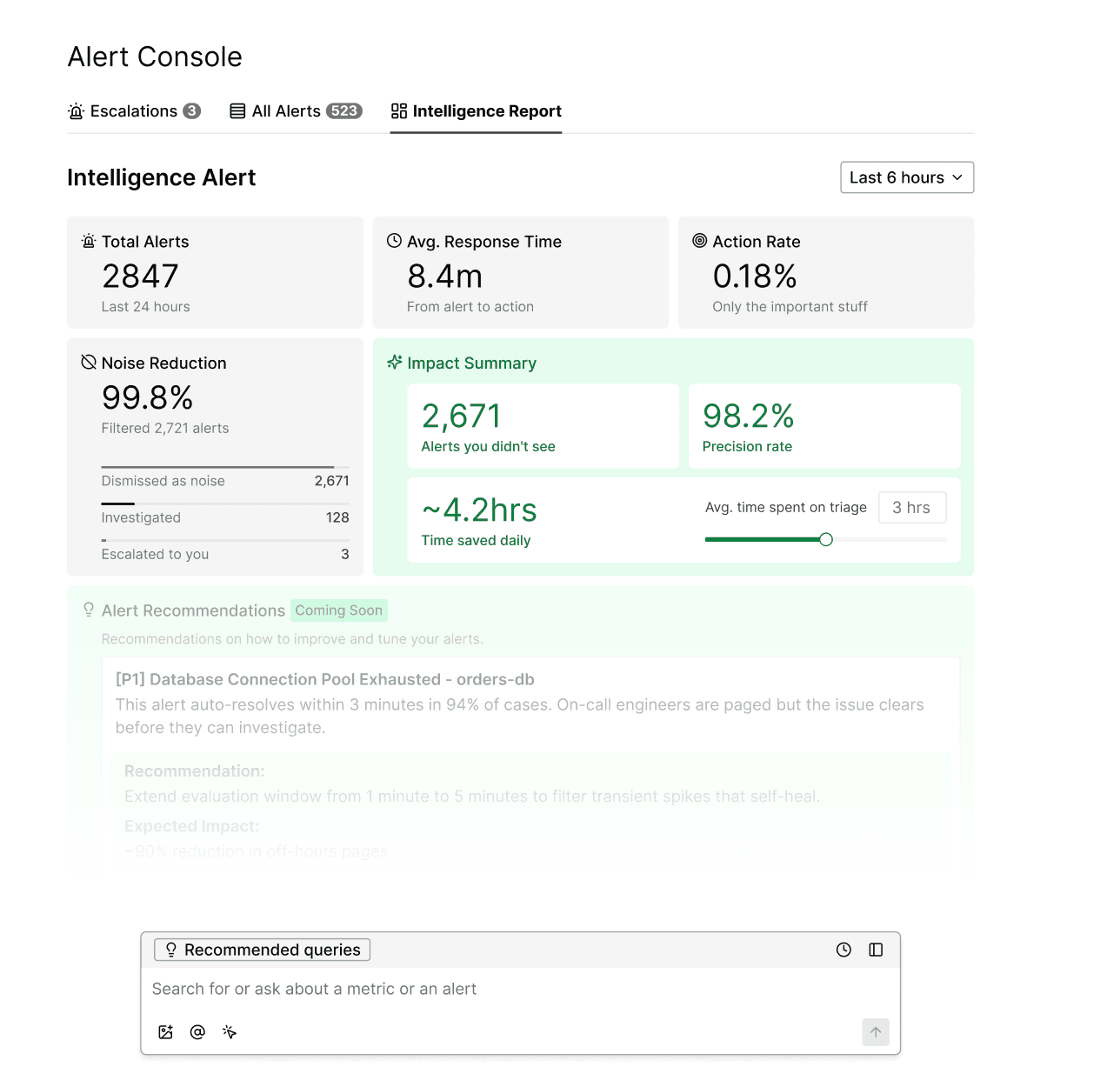
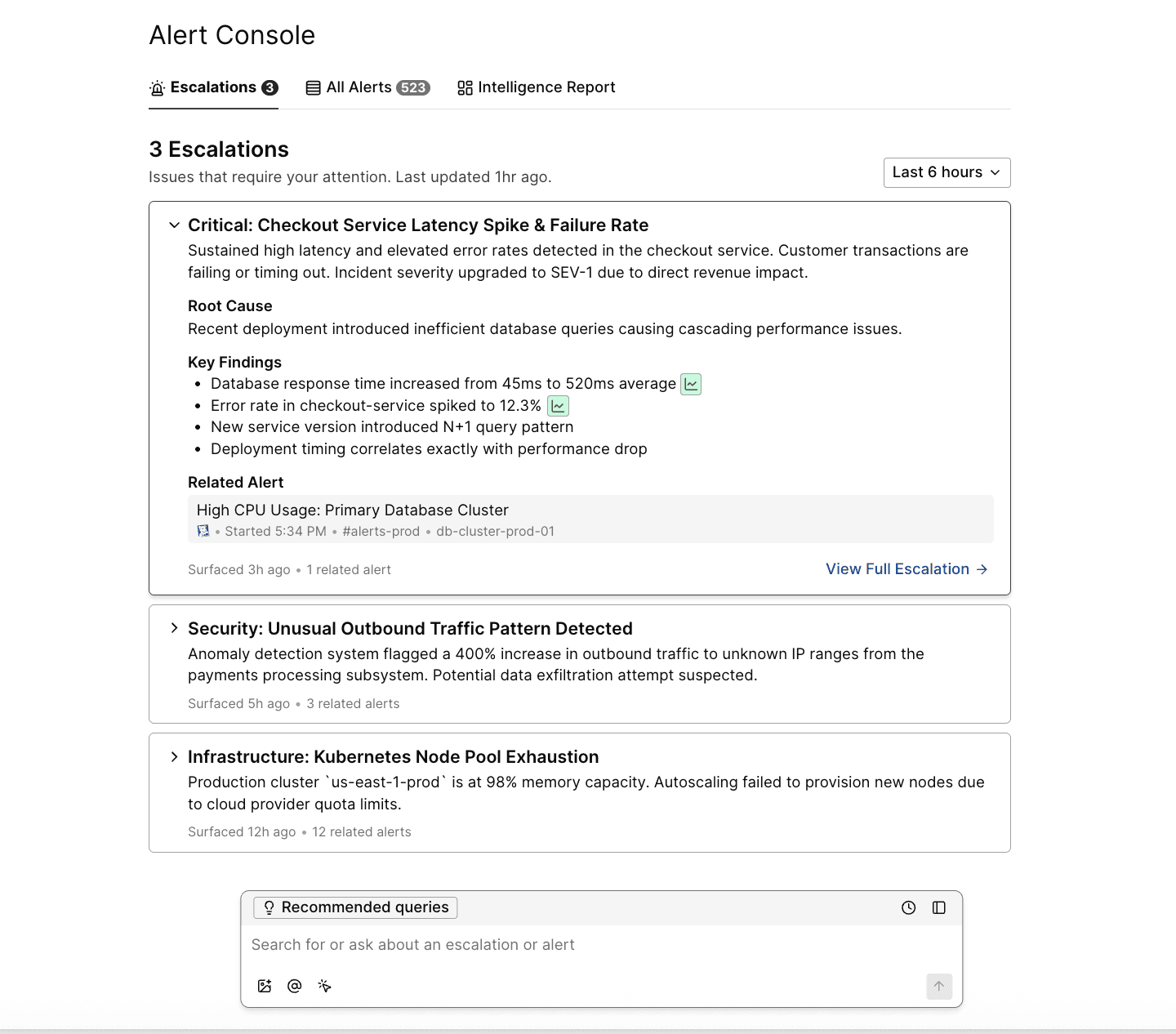
Instead of monitoring an alert channel, you see what actually matters:
A prioritized, opinionated view — Only alerts that warrant attention are surfaced, with context assembled.
Full transparency — Every evaluated alert is visible, including why it was or wasn’t escalated.
Slack-native experience — Investigations and findings appear directly in threads.
Natural-language interaction — Ask, “What’s happening with payments?” and receive grounded answers.
The Shift: From Dashboard to Agent
Traditional alert tools are systems of record. They assume humans will do the triage work—scrolling, filtering, and clicking through lists.
Alert Console inverts this model. The agent does the investigation. The UI shows you results.
This isn’t a dashboard you monitor. It’s a colleague watching your alerts and telling you when something needs attention—with the work already done.
Built for Scale
The first question teams ask: Can this handle our volume?
Yes. Traversal is designed from the ground up for enterprises dealing with tens of thousands of alerts daily.
Parallelized analysis. Alerts are analyzed independently and concurrently, designed to scale horizontally as volume grows.
Efficient investigation. Traversal evaluates every single alert, non-stop; triaging which alerts warrant deeper analysis.
Learns your patterns. As Traversal watches your alerts over time, it builds a model of what's normal for your infrastructure. Recurring patterns get faster to evaluate, while new deviations get more attention.
No sampling. Every alert is evaluated—partial coverage defeats the purpose.
The teams with the worst alert fatigue are often the ones who need this most, and we’re built for this use case.
Catch Problems Before They Become Incidents
Reducing noise is only part of the story.
The alerts that get buried in noisy channels are often the earliest warnings: the canary before the outage, the correlated symptoms across services that only make sense when someone connects them. When patterns are surfaced early, teams can intervene before incidents escalate.
And if an incident does occur, that same alert data accelerates resolution. Traversal can surface the alerts that fired beforehand, related symptoms across systems, and patterns that only become clear in hindsight. Alerts that would have been ignored become evidence in your root cause analysis.
The alerts you’re not watching still get watched.
Getting Started
Alert Console is available now. Book a demo to see it in action.
Thanks to Traversal’s Members of Technical Staff Ali Soyupak, Divyansh Agarwal, Hajir Roozbehani, and Vishal Bomdica for the engineering work that made Alert Console possible.